Skool Review 2026: What the Pricing Page Doesn't Tell You
Skool is the simplest way to run a paid community. The pricing page just leaves out which features need the $99 plan and how much Skool keeps when its directory sends you members.
This review has affiliate links. If you sign up through them, I may earn a commission at no extra cost to you. It never changes what I write.
Skool is the simplest way I've found to run a paid community. You get a feed, a course area, a calendar and member payments in one place, and you can set the whole thing up in an afternoon.
But the pricing page leaves out the two things that decide what Skool really costs you: which features are locked to the $99 plan, and how much of your members' money Skool keeps when its own directory sends them to you.
Several Skool reviews say the two plans are identical apart from the transaction fee. Skool's own upgrade screen says otherwise. Here's what I found.
The 30-second version
Get it if: you want a simple community with courses and you'd rather your members show up for each other than for a slick website.
Skip it if: you need quizzes, certificates or a fully branded site, or you plan to rely on Skool's directory for members and can't give up 30% or more of their fees.
My experience with Skool
I've run a small Skool group since 2024: a community for my animal rescue work. It's on the Hobby plan.
For this review, I went back into that group in November 2026 and tested it the way a new creator would. I built a course with a level-locked lesson, set up an event, opened every settings tab, checked the pricing options for members and looked at what Skool asks before it will list a group in its directory. Then I deleted everything I added.
Everything below comes from those screens unless I say otherwise.
What Skool is
Skool is a community platform. Each group gets a discussion feed, a classroom for courses, a calendar for events, a member list and leaderboards, and Skool handles member payments for you.
There's no page builder and no website. That's the point: members land on one simple page and everything happens inside the group.
Skool pricing in 2026: Hobby vs Pro
There are two plans for creators. Both are billed per group, and the billing screen in my account offered 2 months free for switching to annual.
| Hobby | Pro | |
|---|---|---|
| Monthly price | $9 a month | $99 a month |
| Transaction fee on member payments | 10% | 2.9% |
| Unlimited admins | No | Yes |
| Plugins and affiliates | No | Yes |
| Custom URL | No | Yes |
| Hide suggested communities | No | Yes |
| Webinars | No | Yes |
| Advanced analytics | No | Yes |
That table comes straight from the upgrade screen Skool shows when a Hobby group tries to claim a custom URL. When I clicked it, Skool quoted $90 to upgrade that day (my $9 was credited), then $99 a month.
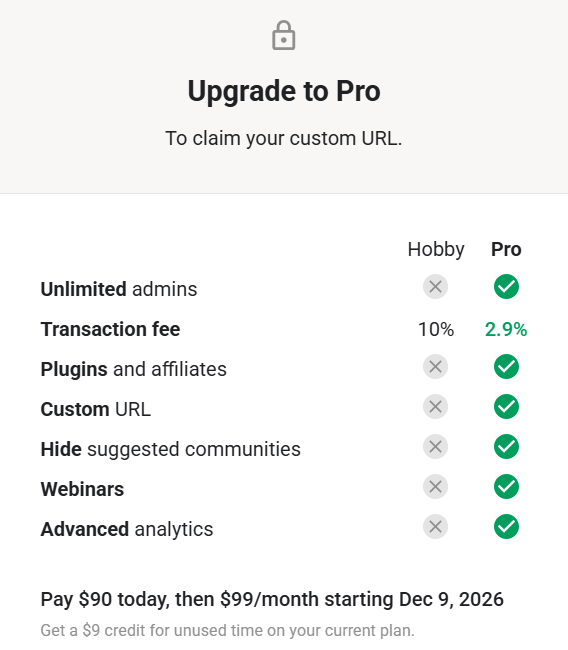
Some reviews report that the Pro fee rises above 2.9% for higher-priced memberships. I didn't see that on the upgrade screen, so check your own checkout before you price a membership above about $900.
The Pro-only plugins
The Plugins tab lists twelve plugins. Three work on Hobby:
- Membership questions (ask people questions before you approve them)
- Unlock chat at a set level (cuts down DM spam)
- Unlock posting at level 2 or 3 (cuts down low-quality posts)
The other nine are marked Pro: auto DM to new members, onboarding video, Zapier, Meta pixel tracking, Google Ads tracking, a cancellation video, links in the group info box, instant approval and webhooks.
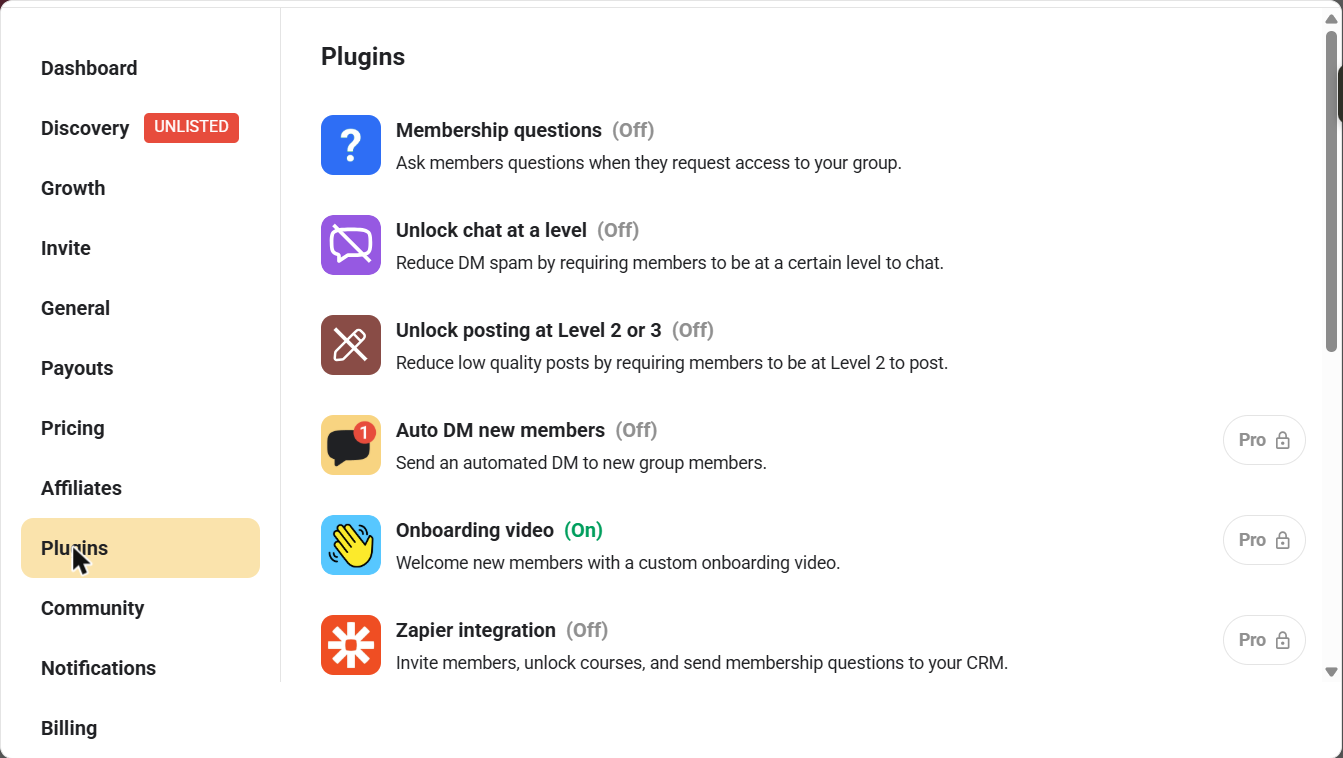
If you plan to run ads to your group, connect it to a CRM or auto-approve members, budget for Pro from the start.
Which plan should you pick?
Run the fee math before you decide. Pro costs $90 more a month but saves you 7.1% on every member payment, so it starts paying for itself at about $1,270 a month in member payments.
Below that, Hobby is cheaper, as long as you can live without the Pro features above. A free community has no member payments at all, so Hobby is the obvious choice there.
The Discovery cut most reviews skip
Skool runs a directory where people browse and search for groups. In my settings, Skool describes it as a way to reach "35 million users" through discovery search, suggested communities and off-site ads.
Two things to know before you count on it.
First, you have to qualify. My group showed as "Not showing in Discovery" until it has a cover image, a group description, a completed about page, a first post and 3 friends who've joined.
Second, Skool takes a share of members it brings you. It's called Growth boost, and you pick the share:
- Off: no traffic from Skool
- 30%: Skool's own label is "Give me members but I keep 70%"
- 40%
- 50%: "Give me more members and I'll go 50/50 with you"
- 60%
- 70%: "Give me maximum members! I'll sacrifice some profit for growth"
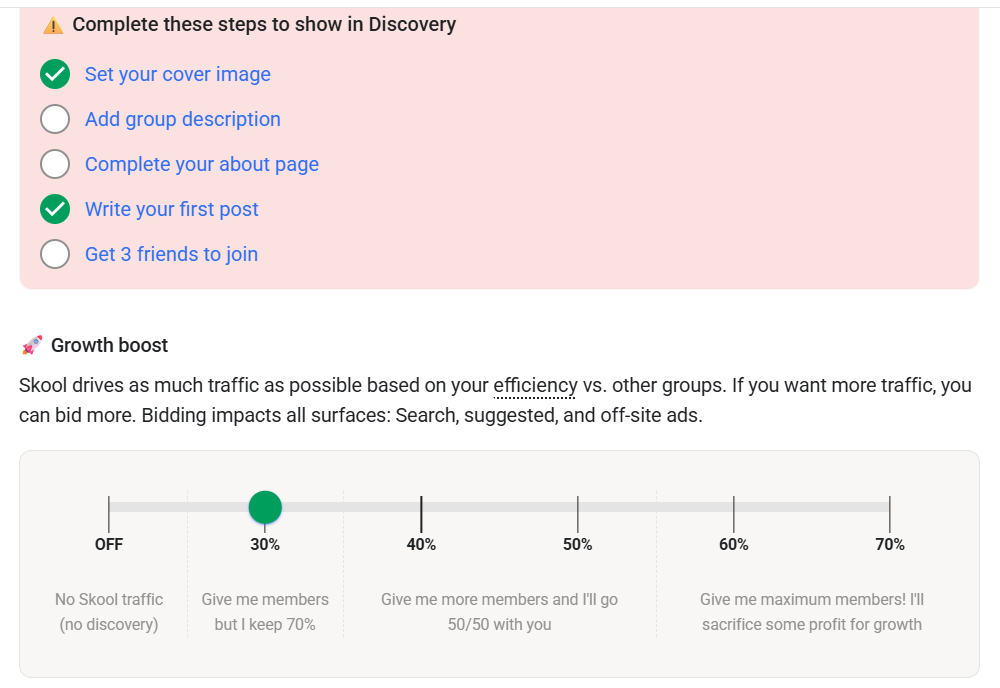
Skool's explanation is that it sends traffic based on how well your group converts compared with others, and bidding more gets you more. A higher bid applies to search, suggestions and off-site ads.
This isn't hidden, but you only see it once you open the settings. If your plan is to fill a paid group from Skool's directory, factor in that cut on top of the transaction fee.
The way Skool words each option, the share applies to members its network brings you, not the ones you bring yourself. So the cleanest setup is your own traffic first and Discovery as a bonus.
What it's like to build on Skool
The classroom
Creating a course is one dialog: a name, a description, a cover and an access rule. Skool adds a blank first lesson for you and saves instantly.
The access rules are the most flexible part of the product:
- Open: every member can see it
- Level unlock: members unlock it at a level you choose (I locked mine to level 2)
- Buy now: a one-time price for that course
- Time unlock: members get it after a set number of days
- Private: only members on a tier or people you pick
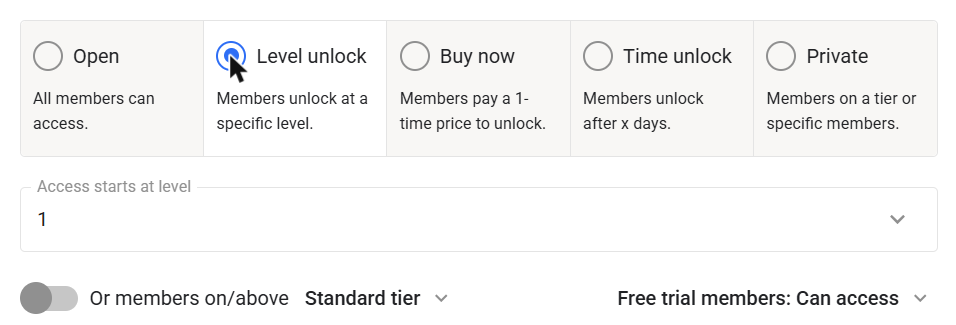
You can also decide whether free-trial members can access each course.
Lessons use a simple editor with headings, lists, quotes, code blocks, images and links. Video comes from a YouTube, Loom, Vimeo or Wistia link, or a direct upload. Each lesson can carry resource links, resource files, a transcript or a pinned community post.
You organize lessons into pages and folders, preview the course as a member, duplicate it, or share it to another group using a course key.
What I didn't find: quizzes or completion certificates. If your course needs graded tests, that's worth knowing up front.
The community feed
Posts can include files, links, videos, polls, emoji and GIFs, and you sort them into categories. Admins get a "Send email to all members" switch on each post, which is handy for announcements.
Calendar and events
The event form covers the basics: title, date, time, duration, timezone and recurring events. You can host on a Skool call or add a link for Zoom, Google Meet or an in-person venue.
You can limit who sees an event to all members, a level, a tier, or people enrolled in a specific course, and Skool can email a reminder one day before.
Levels and leaderboards
There are nine levels. Members earn points from activity, and your leaderboards show the top members over 7 days, 30 days and all time.
The useful part is tying levels to access. A course that unlocks at level 2 gives new members a reason to post and engage before they get the good stuff.
How you charge members
The Pricing tab offers five models:
- Free
- Subscription: monthly, annual or both
- Freemium: free to join, with 1 or 2 paid upgrade tiers
- Tiers: 2 or 3 paid tiers
- One-time payment
You can switch on a 7-day free trial for members, and a "Close doors" option lets you stop new signups.
Reviews that can't be gamed easily
Only paying members can review your group, and Skool prompts them after 30 days. If you offer incentives for reviews, Skool says it adds a red warning to your about page saying the reviews were incentivized. That's good news if you're a member deciding which group to join.
The dashboard
The owner dashboard shows members, monthly recurring revenue, engagement and retention, plus visitors, signups, conversion rate and new revenue for the last 30 days.
What Skool does well
- Speed. Course creation, lessons and settings are quick and plain. There's very little to learn.
- Flexible course access. Level unlocks, drip by days, one-time purchases and tier-only courses cover most ways people sell knowledge.
- Built-in reasons to engage. Levels, leaderboards and level-locked content push members to participate.
- Several ways to charge. Free, freemium, tiers, subscriptions and one-time payments, with an optional member trial.
- Honest reviews. Only paying members can review, and incentivized reviews get flagged.
What to look at before you commit
- Hobby is lighter than it looks. Custom URLs, Zapier, ad pixels, auto-approval and webhooks all need Pro.
- Fees add up on Hobby. 10% of every member payment is a lot once a group grows, so check the $1,270 break-even.
- Discovery isn't free traffic. It's a revenue share you choose, from 30% to 70%.
- No quizzes or certificates showed up in my test.
None of these are dealbreakers for most coaches and creators. They're just easier to plan for before you launch than after.
Making money from Skool beyond memberships
Skool has two separate referral systems.
Skool's own affiliate program. Anyone with a Skool account gets a referral link under Settings > Affiliates. My account showed it as active straight away. Skool pays 40% of the subscription for life on any group created through your link (Skool). That's $3.60 a month for a Hobby group and $39.60 for a Pro group.
Skool's help center adds that if a member creates a group from inside your group, the referral is credited to you automatically, and notes that this "Auto Affiliate" feature is only on Pro (Skool Help).
Your group's own affiliate program. In your group settings you can pay members 10%, 20%, 30%, 40% or 50% of the membership fees of people they refer. Skool marks 40% as "most effective". On the upgrade screen, affiliates are listed as a Pro feature.
The GrowthToolGuide verdict
Skool is the fastest way to launch a paid community with courses, as long as you plan around what the $9 plan leaves out.
Get it if
You're a coach, consultant or creator who wants members engaging with each other and a simple course area, and you'll bring most of your own members.
Skip it if
You need quizzes, certificates or a branded website, or you're counting on Skool's directory to fill a paid group and can't give up 30% or more of those members' fees.
Try Skool Affiliate link: I earn a commission if you sign up, at no extra cost to you.
Skool FAQ
How much does Skool cost?
$9 a month on Hobby or $99 a month on Pro, per group. My billing screen offered 2 months free for annual billing.
What's the transaction fee on Skool?
10% of member payments on Hobby and 2.9% on Pro, according to Skool's upgrade screen.
Can I use a custom URL on the Hobby plan?
No. When I tried to change the URL on Hobby, Skool asked me to upgrade to Pro.
Does Skool take a cut of members it sends me?
Only if you switch on Growth boost. You choose a share from 30% to 70% of revenue from members Skool brings you, or leave it off and get no directory traffic.
Does Skool have quizzes or certificates?
I didn't find either in the classroom during my November 2026 test.
Can I sell a single course on Skool?
Yes. Set the course to "Buy now" and members pay a one-time price to unlock it.
Does Skool have an affiliate program?
Yes. Skool pays 40% of the subscription for life on groups created through your link, and every account gets a link under Settings > Affiliates.
Who can leave reviews on a Skool group?
Only paying members, and Skool prompts them after 30 days.
Which would matter more for your group: the lower fee on Pro, or the members Skool's directory could send you?
Start your Skool group Affiliate link: I earn a commission if you sign up, at no extra cost to you.