How to Make Money on Skool: 6 Ways, With the Fees Worked Out
Most guides stop at "charge a monthly fee." Skool gives you six ways to get paid, and each one changes what you keep.
This guide has paid links: if you sign up through them, I may earn a commission at no extra cost to you. It never changes what I write. How I test.
Picture the moment someone asks to pay you. Maybe it's a follower who wants more than your free posts, or a client who'd rather learn in a group than book you one to one. You say yes, and then the questions start: what do I charge, how do they pay, and how much of it do I keep?
Skool answers the first two in a few clicks. The third one depends on which of its six money models you pick, and that's what this guide covers, with the fees worked out for each.
The short version: start with one model, on the $9 plan, and only add a second once the first is paying. Move to the $99 plan when members pay you more than about $1,270 a month.
First, the fees every model shares
Skool charges you a plan fee and takes a cut of every payment your members make. According to Skool's payments help article:
| Hobby ($9 a month) | Pro ($99 a month) | |
|---|---|---|
| Cut of each payment | 10% + 30¢ | 2.9% + 30¢ |
| Payments of $900 or more | 10% + 30¢ | 3.9% + 30¢ |
Card processing is included in those rates, so there's no separate Stripe fee on top. Members pay in US dollars, and Skool pays your balance out every Wednesday in your local currency.
Keep one number in your head: $1,270 a month. Below that in member payments, Hobby costs less in total. Above it, Pro's lower cut more than covers the extra $90. Every example below uses these rates, and you can check your own numbers in the Skool fee calculator.
1. A paid community with a monthly price
This is the model most people mean when they say "a Skool group." Members pay every month for access to your feed, your classroom and your live calls. Skool also lets you offer annual billing and a 7-day free trial for members.
What it suits: anything people want ongoing help with. Coaching, a skill they're building, a niche they want to stay current in.
The numbers: 60 members at $29 a month is $1,740 in payments.
- Hobby: $9 + $174 + $18 = $201 a month
- Pro: $99 + $50 + $18 = about $167 a month
At this size, Pro already saves about $34 a month.
Make it work: a fixed weekly call is the simplest reason for people to keep paying. Skool's calendar handles recurring events, time zones and a reminder email the day before, and Skool Call lets you run the call itself without Zoom.
2. Freemium: free to join, paid to go deeper
Freemium gives one group a free plan and a paid plan. Anyone can join free, and members can upgrade from inside the group at any time. You choose what the paid plan unlocks.
What it suits: people who don't have a buyer list yet. The free side is where strangers get to know you; the paid side is where they get your best material and your time.
The numbers: say 20 of your free members upgrade at $49 a month, which is $980 in payments.
- Hobby: $9 + $98 + $6 = $113 a month
- Pro: $99 + $28 + $6 = about $133 a month
Here Hobby is cheaper. Don't upgrade just because the word "Pro" sounds more serious.
Make it work: the free side has to be genuinely useful, but not complete. A common split is a free feed and starter course, with live calls and the full curriculum on the paid plan.
3. Tiers: more than one price for the same group
Tiers let you offer several paid plans in one group, each with its own benefit. Unlike Freemium, every tier is paid.
What it suits: groups with a clear "more help" option. A standard plan with the course and the community, and a higher tier with a monthly hot seat or a small group call.
Make it work: keep it to two or three tiers. Each one should answer a different question a buyer is asking ("just the material," "the material plus feedback," "direct access to you"), not repeat the same thing with a bigger number.
Events and courses can be limited to a tier, so the higher plan's call only shows up for the people paying for it.
4. One-time payments: courses and pop-up groups
Skool supports one-time pricing in two places:
- A whole group, for a single price. Skool's help center suggests this for lifetime access courses, pop-up groups and seminars.
- A single course inside a group, using the "Buy now" access option. I tested it in my own group: you set a price, and members pay once to unlock that course.
What it suits: a defined program with an end date, like a six-week challenge or a workshop series, or a course you want to sell on its own.
The numbers: 15 people buy a $199 course in one month, which is $2,985.
- Hobby: $9 + $298.50 + $4.50 = $312
- Pro: $99 + $86.57 + $4.50 = about $190
One-time sales push you over the $1,270 line fast, so a launch month is often the moment Pro starts paying for itself.
5. Member affiliates: let your members sell for you
Skool lets a paid group pay its own members a commission for bringing in new paying members. In my group's settings, the rates run from 10% to 50%. Skool's upgrade screen lists affiliates as a Pro feature, but when I opened the Affiliates tab on my $9 group in November 2026, the options were there with no Pro label. I haven't switched it on, so I can't yet confirm it pays out on Hobby. If member referrals are central to your plan, budget for Pro.
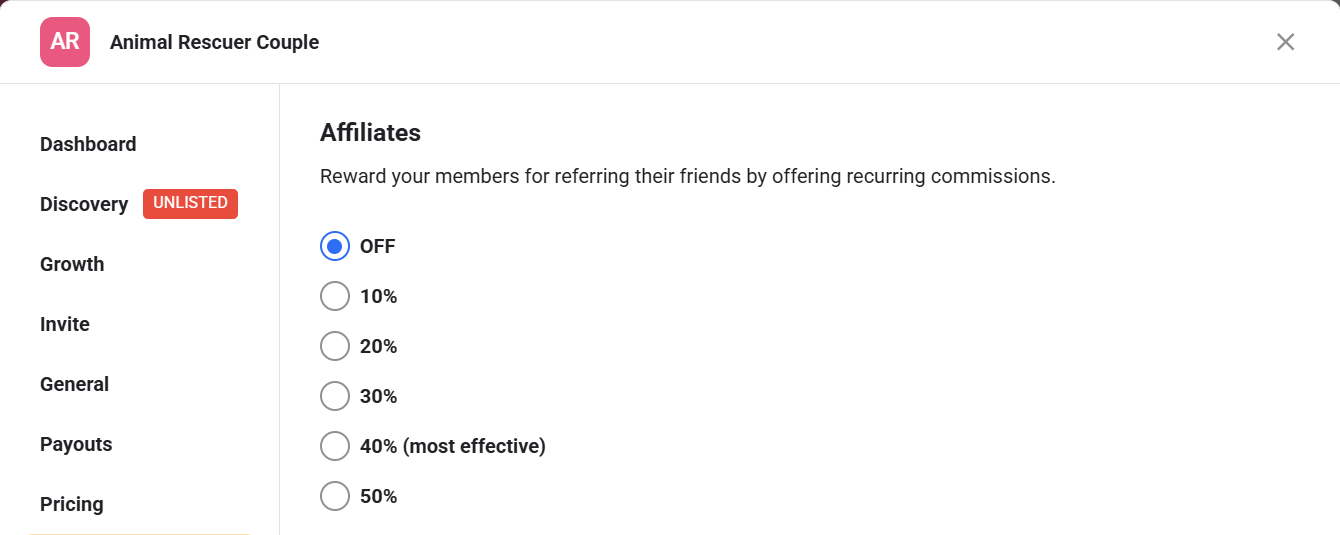
Two rules from Skool's help center: only members can refer (owners and admins can't), and the member has to be in a paid group with affiliates turned on.
What it suits: groups where members are already recommending you. It turns word of mouth into something they're rewarded for.
Watch the stack: a 30% member commission comes on top of Skool's own cut. On Hobby, a referred $50 payment would leave you about $29.70 once both are taken out. Set the rate with that in mind.
6. Skool's own affiliate program
The last way doesn't involve your members paying you at all. Skool pays 40% of the subscription for life on any group created through your link. Every account gets a link under Settings, in the Affiliates tab. At current prices that's about $39.60 a month for each Pro group you refer and $3.60 for each Hobby group.
Skool also pays you automatically when one of your members starts their own group from inside yours. That's called Auto Affiliate, and Skool's help center says it's Pro only.
Full disclosure: this is how this site earns from Skool. The buttons on this page are my affiliate link, and I say so next to each one.
What it suits: people who teach community building, coaching business or creator topics. If your members are likely to start groups of their own, this can become a real second income.
Start a Skool group Paid link: I earn a commission if you sign up, at no extra cost to you. Skool starts with a free trial.
What a realistic Skool group looks like
It's easy to see the biggest groups and assume that's normal. It isn't. RevenueGeeks pulled all 1,000 groups on Skool's trending list in July 2026 and found the median group had 205 members. In its September 2026 pull, 95.9% of those trending groups charged a price, and the median monthly price was $39.
Those are trending groups, so the typical group outside that list is smaller still. A paid group of a few dozen people paying $30 to $50 a month is a normal, healthy result, and on the numbers above it can already justify the $9 plan many times over.
The other cut to know about: Growth boost
Skool runs a directory where people browse for groups. If you switch on Growth boost, Skool sends you members and takes a share of what those members pay. In my settings the options ran from 30% to 70%, or off. It only applies to members Skool's network brings you, not the ones you bring yourself.
If you plan to fill a paid group from the directory, add that share to your fee math. I cover it in detail in my Skool review.
Which model to start with
- You have a few people already asking for help: start with model 1, a monthly price, on Hobby.
- You have an audience but no buyers yet: start with model 2, Freemium, and make the free side worth joining.
- You have a program with a clear end: start with model 4, a one-time price.
- You're already earning and members recommend you: add model 3 (tiers) or model 5 (member affiliates).
Then run your own numbers in the Skool fee calculator before you pick a plan. For how Skool compares with other platforms on fees, see Skool alternatives.
Frequently asked questions
Can you really make money on Skool?
Yes, but Skool doesn't bring you buyers on its own. It gives you the checkout, the community and the courses. The money comes from people you bring in, plus any members Skool's directory sends you in exchange for a share of their payments.
How much does Skool take from what I earn?
On the $9 Hobby plan, 10% plus 30 cents of every payment. On the $99 Pro plan, 2.9% plus 30 cents, or 3.9% plus 30 cents on payments of $900 or more. Those figures come from Skool's payments help article.
What's the cheapest way to start making money on Skool?
The $9 Hobby plan with a monthly subscription. Below about $1,270 a month in member payments, Hobby costs less in total than Pro.
Do I need an audience before I start?
It helps a lot. A free group is the usual way to build one inside Skool, since Freemium lets free members upgrade to a paid plan without leaving the group.
How do Skool payouts work?
Skool's help center says your available balance is paid out every Wednesday, and the first payout can take up to 14 days. Members pay in US dollars and you're paid in your local currency.
Sources
Fees, payouts and pricing models come from Skool's help center articles on payments, group pricing and member affiliates, and Skool's affiliate program page, all checked November 11, 2026. The plan and affiliate screenshots are from my own Skool group. Community size and price figures are from RevenueGeeks' July and September 2026 pulls of Skool's trending list.